Text-To-ASCII: A Free Browser-Based ASCII Art Generator with 500+ Fonts
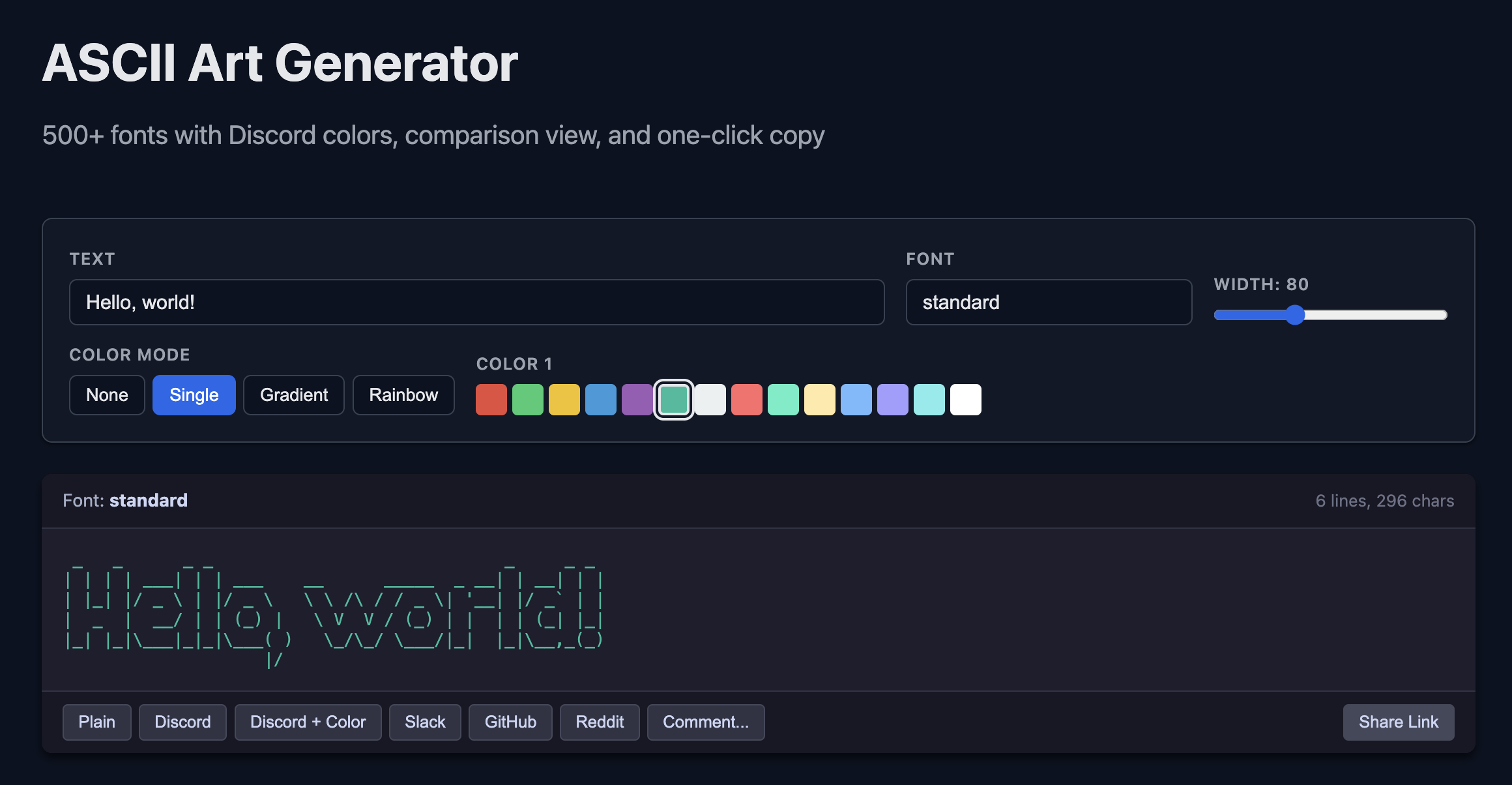
ASCII art isn’t a relic of the ’90s — it’s thriving in Discord servers, GitHub READMEs, code comments, and Slack channels everywhere. We built a free, browser-based Text-To-ASCII generator that puts 500+ fonts, ANSI color gradients, and one-click platform-specific copy at your fingertips. No install required.
Try it now: Zimventures ASCII Art Generator
What the Text-To-ASCII Generator Does
Type any text and instantly convert it to ASCII art. Here’s what you get:
- 500+ FIGlet fonts organized into 7 categories and 3 smart collections
- 14 ANSI colors with single-color, multi-stop gradient, and rainbow modes
- Gradient interpolation that follows a 12-position hue wheel for smooth color transitions
- One-click copy formatted for Discord, Slack, GitHub, Reddit, or 10 programming languages as code comments
- Shareable links that encode your exact text, font, colors, and width in the URL
- Real-time preview — see your ASCII art update as you type
Powered by pyfiglet
The font rendering engine is pyfiglet, a Python port of the classic FIGlet program. FIGlet (Frank, Ian, and Glenn’s Letters) has been generating ASCII art from text since 1991. The pyfiglet library bundles 500+ community-created font files, giving you an enormous range of styles — from clean and readable to wild and decorative.
On the server side, generating ASCII art is a single function call:
import pyfiglet
art = pyfiglet.figlet_format("Hello", font="slant", width=80)
That simplicity, combined with a responsive frontend, means you get instant results without any setup.
How to Use It
- Type your text — Enter up to 100 characters in the input field. The preview updates in real time.
- Pick a font — Browse the gallery, search by name, or explore curated categories. Click any font card to select it.
- Choose your colors — Select a color mode (None, Single, Gradient, or Rainbow) and pick from the 14-color ANSI palette.
- Copy for your platform — Click the copy button for your target: Discord, Slack, GitHub, Reddit, or a code comment in your language.
- Share it — Hit the share button to copy a URL that encodes all your settings. Anyone who opens it sees your exact creation.
Font Gallery and Categories
With 500+ fonts, finding the right one matters. The gallery is organized to help:
7 Curated Categories
| Category | Style | Example Fonts |
|---|---|---|
| Block | Large, bold, banner-like | banner, block, colossal, doh |
| Script | Handwriting, cursive feel | script, cursive, italic |
| Small | Compact, terminal-friendly | small, mini, thin, digital |
| Decorative | Artistic, ornate | isometric1, larry3d, ghost, graffiti |
| Retro | Vintage computer aesthetic | bubble, dos_rebel, dotmatrix, electronic |
| Fun | Playful, themed | starwars, drpepper, ghost, puffy |
| Simple | Clean, readable | standard, slant, big, doom |
3 Smart Collections
- Popular — The 24 most-used fonts, hand-picked for quality
- Best for Short Text — 13 fonts that shine with 1–5 characters (big, dramatic styles)
- Best for Headers — 14 fonts ideal for README headings, banners, and section titles
Discovery Features
- Search — Type-ahead filtering across all 500+ fonts
- Favorites — Star fonts you like; they persist in your browser across sessions
- Comparison — Select up to 4 fonts side-by-side to see your text rendered in each
Color Modes and ANSI Gradients
ASCII art doesn’t have to be monochrome. The generator supports Discord’s ANSI color syntax with 14 colors:
Standard: red, green, yellow, blue, magenta, cyan, white Bold: bold_red, bold_green, bold_yellow, bold_blue, bold_magenta, bold_cyan, bold_white
Four Color Modes
- None — Plain text, no color codes. Works everywhere.
- Single — Your entire ASCII art in one color.
- Gradient — Define 2 to 6 color stops. The generator interpolates between them using a 12-position hue wheel, choosing the shortest path around the color circle for natural-looking transitions. For example, a red-to-cyan gradient flows through yellow and green rather than jumping backwards through magenta.
- Rainbow — Automatic cycling through red, yellow, green, cyan, blue, and magenta across the width of your text.
The gradient algorithm handles edge cases like wrapping around the wheel and mixing chromatic colors with white, so you always get smooth results.
Text-To-ASCII Examples
Here’s what real output looks like from some popular fonts:
Standard
 _   _      _ _        __        __         _     _
| | | | ___| | | ___   \ \      / /__  _ __| | __| |
| |_| |/ _ \ | |/ _ \   \ \ /\ / / _ \| '__| |/ _` |
|  _  |  __/ | | (_) |   \ V  V / (_) | |  | | (_| |
|_| |_|\___|_|_|\___/     \_/\_/ \___/|_|  |_|\__,_|
Slant
    ___   _____ ______________   ___         __
   /   | / ___// ____/  _/  _/  /   |  _____/ /_
  / /| | \__ \/ /    / / / /   / /| | / ___/ __/
 / ___ |___/ / /____/ /_/ /   / ___ |/ /  / /_
/_/  |_/____/\____/___/___/  /_/  |_/_/   \__/
Doom
 _____           _
/  __ \         | |
| /  \/ ___   __| | ___
| |    / _ \ / _` |/ _ \
| \__/\ (_) | (_| |  __/
 \____/\___/ \__,_|\___|
Star Wars
 _______   ___________    ____
|       \ |   ____\   \  /   /
|  .--.  ||  |__   \   \/   /
|  |  |  ||   __|   \      /
|  '--'  ||  |____   \    /
|_______/ |_______|   \__/
Isometric
      ___           ___           ___           ___
     /\  \         /\  \         /\  \         /\  \
    /::\  \       /::\  \       /::\  \       /::\  \
   /:/\:\  \     /:/\:\  \     /:/\:\  \     /:/\:\  \
  /:/  \:\  \   /:/  \:\  \   /:/  \:\__\   /::\~\:\  \
 /:/__/ \:\__\ /:/__/ \:\__\ /:/__/ \:|__| /:/\:\ \:\__\
 \:\  \  \/__/ \:\  \ /:/  / \:\  \ /:/  / \:\~\:\ \/__/
  \:\  \        \:\  /:/  /   \:\  /:/  /   \:\ \:\__\
   \:\  \        \:\/:/  /     \:\/:/  /     \:\ \/__/
    \:\__\        \::/  /       \::/__/       \:\__\
     \/__/         \/__/         ~~            \/__/
Speed
__________             _____
___  ____/_____ _________  /_
__  /_   _  __ `/_  ___/  __/
_  __/   / /_/ /_(__  )/ /_
/_/      \__,_/ /____/ \__/
Platform Copy Targets
One of the most useful features: copy your ASCII art pre-formatted for wherever you need it.
| Target | Format |
|---|---|
| Plain | Raw text — paste anywhere |
| Discord | Wrapped in ``` code block |
| Discord + Color | Wrapped in ```ansi with ANSI escape codes for colored output |
| Slack | Code block formatting |
| GitHub | Markdown code block |
| Each line indented 4 spaces (Reddit’s code block syntax) | |
| Code Comments | Wrapped in language-specific comment syntax |
Code Comment Languages
Generate your Text-To-ASCII art as a code comment in 10 languages:
#style: Python, Bash, Ruby/* */style: JavaScript, Java, C, Go, Rust<!-- -->style: HTML--style: SQL
Drop ASCII art banners into your source files, config headers, or CLI tool output.
Shareable Links
Every setting — text, font, width, color mode, and color stops — is encoded into the URL as you work. Click the share button to copy the link. When someone opens it, they see your exact ASCII art with all options pre-filled.
Example link structure:
https://zimventures.com/ascii/?text=Hello&font=starwars&width=80&color_mode=gradient&colors=red&colors=cyan
This makes it easy to share creations in chat, embed in documentation, or bookmark your favorite setups.
Try the Text-To-ASCII Generator
The Zimventures ASCII Art Generator is free, runs entirely in your browser, and requires no account or install. Pick a font, add some color, and copy your ASCII art wherever you need it.
Whether you’re decorating a Discord server, adding flair to a README, or dropping a banner into your Python scripts — 500+ fonts and 14 ANSI colors have you covered.
