The 9-Box Grid - A Leader's Guide to Talent Assessment
The 9-Box Grid - Why Every Leader Needs This Talent Assessment Tool
Have you sat through at least one painful talent review meeting? You know the ones: rambling discussions, conflicting opinions about who’s ready for promotion, and that sinking feeling that you’re making a big dollar decision based on gut feelings and whoever spoke last.
It’s not a great feeling.
That’s why I built a free 9-box tool that’s changing how teams approach talent calibration. But before we talk about the tool, let’s talk about why the 9-box grid matters—and why you should care about it as a leader.
The Performance Review Trap
Here’s a uncomfortable truth: most performance reviews tell you about the past. They’re rearview mirrors documenting what someone already did.
But as a leader, you need a windshield—something that helps you see where your people are going, not just where they’ve been.
That’s the fundamental shift the 9-box grid provides. It forces you to evaluate two dimensions simultaneously:
- Performance: How well they’re doing right now in their current role
- Potential: How far they can grow in the future
This combination reveals insights that performance ratings alone never could.
Why the 9-Box Grid Works
The 9-box isn’t new—McKinsey developed it for GE back in the 1970s. But it’s stood the test of time because it does something rare: it makes abstract talent decisions tangible.
When you plot your team on a 9-box grid, patterns emerge that change everything:
- That high performer who keeps getting promoted? They might have plateaued. (High performance, low potential)
- That struggling team member you’re about to give up on? They might just need the right role. (Low performance, high potential)
- That rockstar everyone loves? Yes, they’re as good as you think. (High performance, high potential)
The grid doesn’t lie. It reveals uncomfortable truths we often avoid in regular conversations.
The Calibration Problem
But here’s where it gets interesting—and where most organizations fail.
The 9-box grid isn’t a solo exercise. Its real power emerges during calibration sessions, where managers come together to discuss and align on talent assessments across the organization.
These sessions are where you discover:
- Sarah’s “high potential” engineer looks average compared to the rest of the org
- That “problem employee” in marketing is actually a star performer in the wrong role
- You have three succession candidates for a position you thought had none
But coordinating these sessions is hard. Really hard.
You need everyone in the same room (or Zoom), you need a way to visualize everyone’s assessments, and you need to do it without creating a bureaucratic nightmare that makes managers hate the whole process.
That’s the problem I set out to solve.
Introducing the Zimventures 9-Box Tool
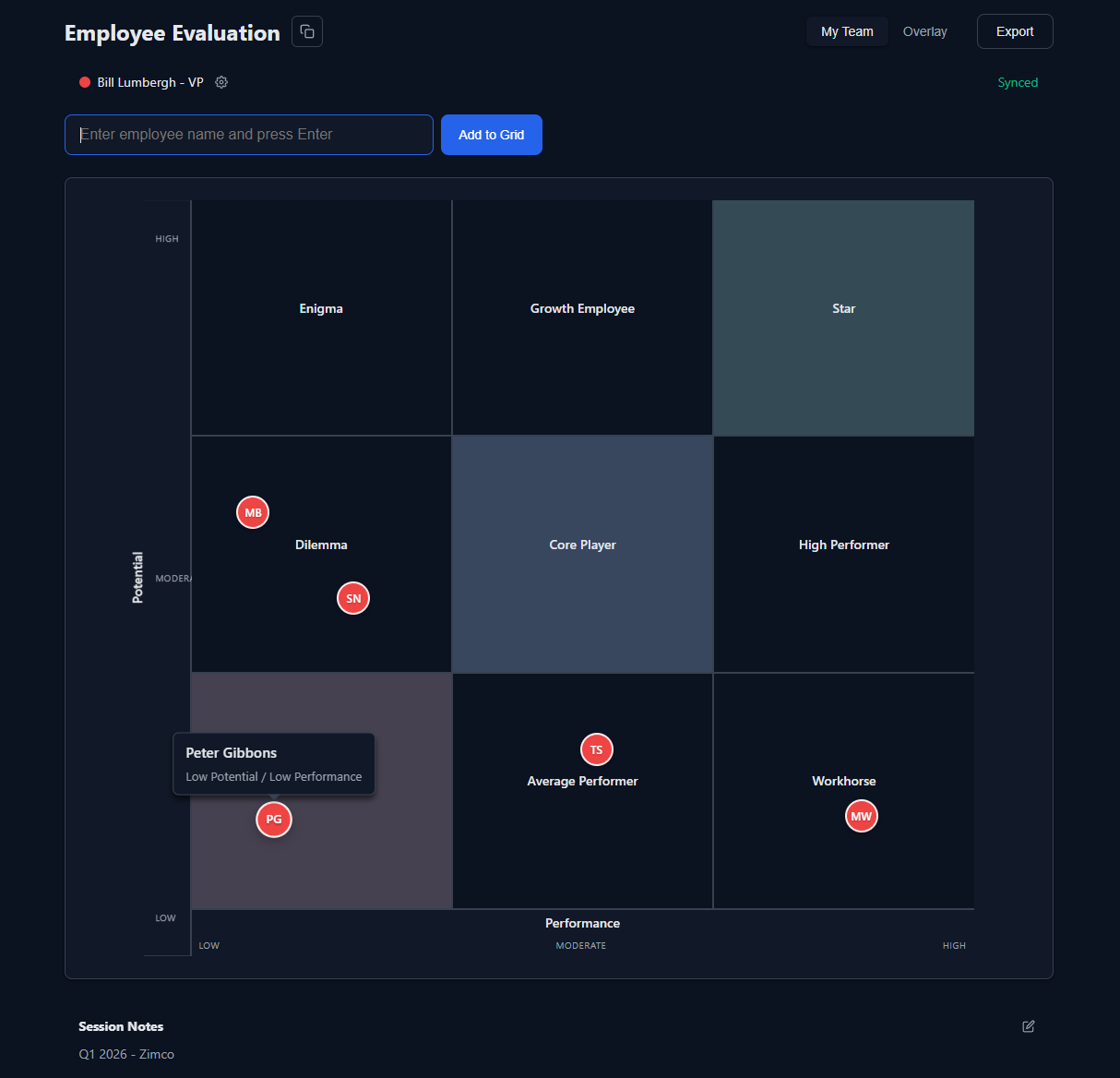
I built a free, collaborative 9-box tool designed specifically for calibration sessions. Here’s how it works:
1. Create a session and share the link Each manager gets a unique URL to join the session. No accounts, no complex setup.
2. Everyone starts in private mode Each manager places their employees independently, avoiding groupthink and anchoring bias.
3. Switch to overlay mode Once everyone’s done, you reveal all placements simultaneously. Each manager’s team appears in their chosen color.
4. Facilitate the conversation Now you can see the whole organization at once. Identify patterns, challenge assumptions, and have the difficult conversations that lead to better talent decisions.
5. Export and act Save your grid as PDF or PNG for documentation and follow-up.
Why I Built This Free
Look, I could have charged for this. Talent management software is expensive, and companies pay thousands for these kinds of tools.
But I didn’t build this to make money. I built it because I’ve seen too many leaders struggle with talent decisions they don’t have to make alone.
Good talent management tools shouldn’t be locked behind enterprise paywalls. Small companies and growing teams need them most—and they’re the ones who can’t afford the expensive options.
So I built something simple, effective, and free. Because better talent decisions lead to better organizations, and better organizations lead to better outcomes for everyone involved.
What Makes This Different
I’ve looked at other 9-box tools out there. Most fall into two camps:
- Enterprise software that costs a fortune and requires training
- Static templates in Excel, PowerPoint, or a PDF that don’t facilitate collaboration
This tool sits in the sweet spot: sophisticated enough to be useful, simple enough to use without training.
Key features:
- Real-time collaboration: Everyone sees updates as they happen
- Color-coded teams: Easy to see which manager placed which employee
- Private and overlay modes: Independent assessment followed by group calibration
- Export options: Professional PDFs and images for documentation
- Zero setup: No accounts, no installations, no IT approval needed
How to Use It Effectively
The tool is easy to use, but here are some lessons learned from helping teams run calibration sessions:
Before the session: - Send evaluation criteria to all managers in advance - Have everyone do independent assessments first - Come prepared with specific examples and data
During the session: - Start in private mode—avoid influencing each other - Use data and examples, not just opinions - Challenge “halo effects” where one strength colors everything - Take notes about development plans for each box
After the session: - Create development plans based on grid positions - Update succession plans - Schedule follow-ups to track progress
The Uncomfortable Conversations
Here’s what nobody tells you about the 9-box grid: it forces uncomfortable conversations you’ve been avoiding.
You’ll discover:
- That person you’ve been promoting isn’t ready for the next level
- Someone you overlooked is a diamond in the rough
- Your “critical” team member is actually a retention risk
- You have gaps in your succession plan you didn’t know existed
These realizations are uncomfortable. They should be. They mean you’re finally getting real about talent instead of operating on assumptions and wishful thinking.
The best leaders I know don’t avoid these conversations. They create space for them.
Final Thoughts
The 9-box grid won’t solve all your talent challenges. No tool will.
But it will help you:
- Make better promotion decisions
- Identify development needs before they become problems
- Build succession plans that actually work
- Have more productive talent conversations
And it will do all this by making the invisible visible. By forcing you to evaluate performance and potential simultaneously. By creating a shared language for talent discussions across your organization.
That’s worth the hour it takes to run a calibration session.
Try the tool. Run a session with your team. See what patterns emerge. Then take action on what you learn.
Your future self—and your organization—will thank you.
